 CLIO IQ
What an AI Sales Assistant Actually Does
An AI sales assistant takes the admin out of selling: it prepares you for the call, writes up what happened, drafts the follow-up and updates the CRM. Here is what to expect, and what to keep human.
An AI sales assistant prepares a brief before each call, records and summarises the conversation, drafts the follow-up, and updates the CRM. The good ones cite the call or email behind every claim, and ask before they write to your CRM or send anything to a customer.
Before the call: the brief
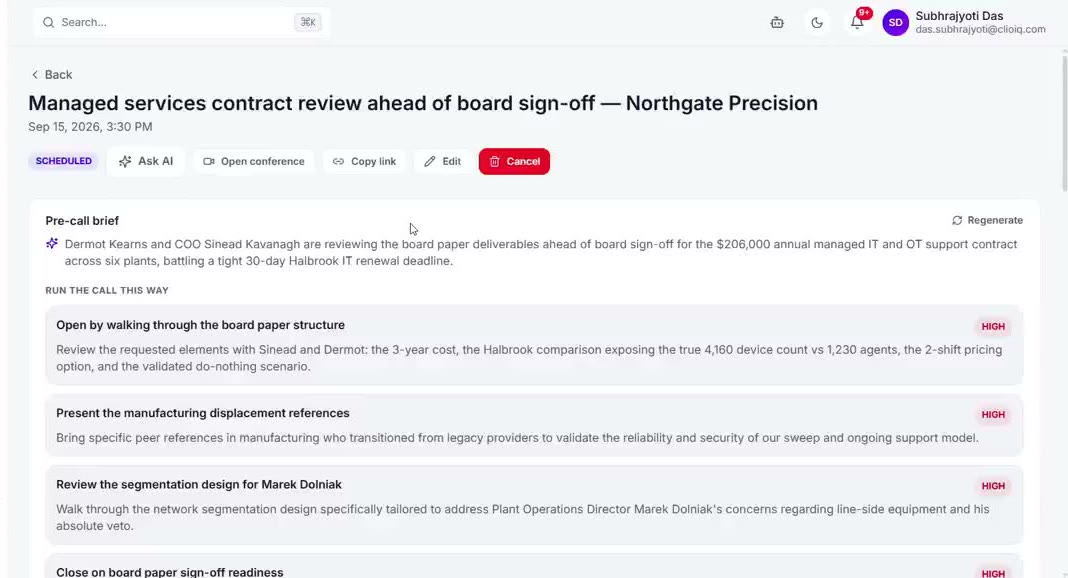
Most of the value of a sales assistant is in preparation. A useful brief answers four questions in under a minute: who is on the call, what happened last time, what is still open, and what should happen on this call. It should be built from earlier calls, emails and the CRM, not from a generic template.
During and after the call: notes, actions and follow-up
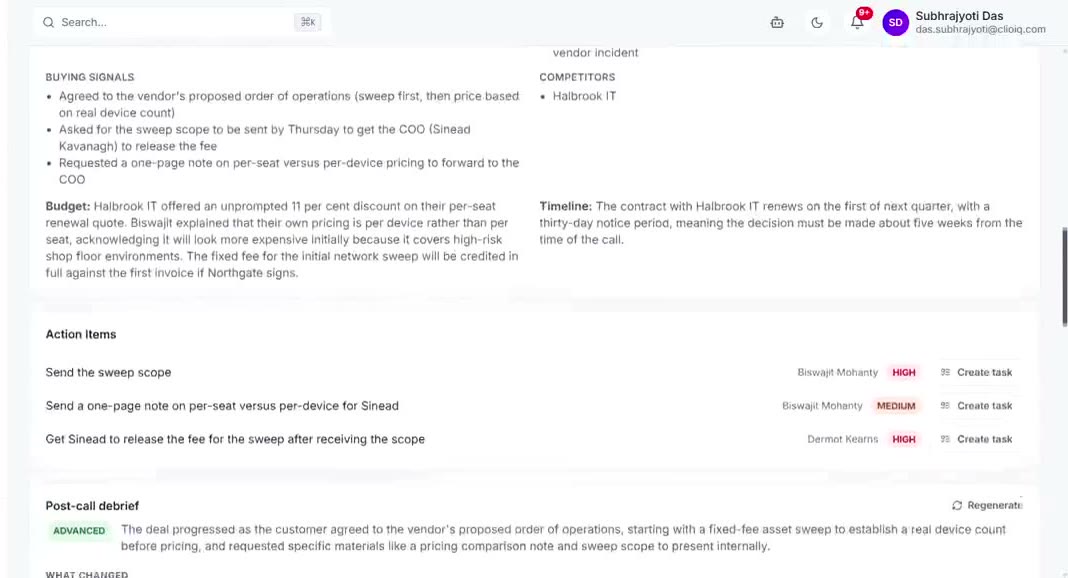
The assistant records the call, then produces a summary, action items with owners, and a draft follow-up email. The test of quality is specificity: a good summary names the budget figure, the date and the person, not just "discussed pricing".
The CRM: where most assistants fall short
Updating the CRM is the most valuable and the riskiest job. A wrong close date or deal stage misleads the whole forecast. Look for three things:
- Field-level updates, not just a note pasted onto the record.
- A source for every change, so anyone can check the line from the call that justified it.
- Approval before writing. Clio AI, Clio IQ's assistant, proposes CRM changes and writes them only once you approve. See Clio AI.
Asking questions of your pipeline
The newest assistants also answer questions in plain language: "Which deals over $50,000 have not had a call in two weeks?" or "What did the CFO say about budget?" Answers should cite the call they came from. See Ask Your Meetings.
What to keep human
- Sending anything to a customer. Drafts save time; a person should still read and send them.
- Judgement on the deal. A risk score is a prompt to look, not a decision.
- Consent. Tell people the call is recorded, and follow the law where you sell.
A day with an AI sales assistant
8:45. The rep opens the day's first meeting. The brief shows the buyer's open concern from the last call, a budget that has not been reconfirmed, and a suggested opening question.
9:00 to 9:40. The assistant joins and records. The rep listens instead of typing.
9:45. A summary, action items and a draft follow-up are waiting. The assistant proposes three CRM changes: a new next step, an updated close date and a new contact. The rep approves two and edits one.
Friday. The manager reviews the pipeline from the risk view rather than a round of verbal updates, and opens the calls behind the two deals that moved.
Where AI sales assistants go wrong
- Confident but wrong summaries. Insist on citations back to the transcript.
- Generic briefs. If the brief reads the same for every account, it is not using your data.
- Silent CRM writes. Changes nobody reviewed erode trust in the CRM quickly.
- Too many notifications. A good assistant surfaces the two deals that need you, not twenty alerts.
How to evaluate one in a week
- Connect your calendar and CRM on day one.
- Let it join five real sales calls.
- Check every CRM change it proposes against the recording.
- Ask a manager to use only its output to review those five deals.
Clio IQ's 14-day trial includes 5 hours of notetaking, enough for that test, with no card required.
Frequently asked questions
What is an AI sales assistant?
Software that prepares briefs, records and summarises calls, drafts follow-ups and updates the CRM for sales reps.
Can an AI sales assistant update Salesforce or HubSpot?
Many can. Check whether it updates fields or only attaches notes, and whether you approve changes first. Clio IQ syncs with Salesforce, HubSpot and Zoho.
Will an AI assistant send emails to customers on its own?
It should not without your approval. Clio AI drafts and proposes; you approve before anything is written or sent.
How is an AI sales assistant different from a notetaker?
A notetaker writes up the meeting. A sales assistant also prepares the next call and keeps the CRM current.
Try it on your own calls.
14 days free, no card. Or we'll walk you through it on a real deal.